Loading Image concept in salesforce

Where you can use this in salesforce??
When you have rerender some another fields based on picklist value change.

Add following line of code to your css file


#loading-image {
position: fixed;
top: 40%;
left: 50%;
}
#loading {
width: 100%;
height: 100%;
top: 0px;
left: 0px;
position: absolute;
display: none;
opacity: 0.5;
filter: alpha(opacity = 50);
-moz-opacity: 0.5;
background-color: #fff;
text-align: center;
z-index: 100;
}

Add following line of code to your JS file


//function for showing loading image
function showLoadingImage() {
document.getElementById('loading').style.display='block';
}


//function for hiding loading image
function hideLoadingImage() {
document.getElementById('loading').style.display='none';
}

Add following line of code anywhere on your page


Loading...

Now Call showLoadingImage() method through events i.e onclick or onchange and Call hideLoadingImage() method through events i.e oncomplete

Showing and hiding Pop-up

Add following line of code to your css file


.black_overlay{
display: none;
position: absolute;
top: 0%;
left: 0%;
width: 100%;
height: 100%;
background-color: black;
z-index:1001;
-moz-opacity: 0.8;
opacity:.80;
filter: alpha(opacity=80);
}
.white_content {
background-color: white;
border: 5px solid #0f2c52;
border-radius: 10px;
display: none;
height: 21px;
left: 37%;
overflow: auto;
padding: 10px;
position: fixed;
text-align: center;
top: 40%;
width: 308px;
z-index: 1002;
}

Add following line of code to your JS file


function showPopUp() {
document.getElementById('light').style.display='block';
document.getElementById('fade').style.display='block';
}
function hidePopUp() {
document.getElementById('light').style.display='block';
document.getElementById('fade').style.display='block';
}

Add following line of code to your body tag


Mass submit approval process through apex code


/******************This method assign selected applications to selected user/queue*************/
public PageReference assignApplication() {
PageReference pageRef = null;
List requests = new List();
SavePoint sp = Database.setSavePoint();
try {
for(ApplicationWrapperClass appWrapper : applicationWrapperList) {
if(appWrapper.isSelected) {
Approval.ProcessSubmitRequest req = new Approval.ProcessSubmitRequest( );
req.setComments('Submitted for approval. Please approve.');
req.setObjectId(appWrapper.application.Id);
req.setNextApproverIds(new List{selectedUserOrQueue}) ;
requests.add(req);
}
}
update applicationList;
Approval.process(requests);
success = true;
pageRef = Page.BulkAssignApplication.setRedirect(true);
} catch(Exception e) {
Apexpages.addMessage(new Apexpages.Message(Apexpages.severity.ERROR, e.getMessage() + '**' +e.getStackTraceString()));
Database.rollback(sp);
}
return pageRef;
}

Querying DateTime field in SOQL dynamically


Export_String_Batch__c batchSettings = Export_String_Batch__c.getInstance('DEFAULTS'); //fetching record from custom setting list.
String str = ((DateTime)batchSettings.LastExecutedDate__c).format('yyyy-MM-dd\'T\'hh:mm:ss\'Z\'');
String queryStr = 'SELECT Id FROM Account WHERE CreatedDate ='+str;
List current = database.query(queryStr);

Optimized class to reduce Describe limit in salesforce


/**
*The purpose of this class is to reduce the Describe limits and increasing performance of your app
*author:Sandeep
**/
public class SchemaCache {
private static Map gdMap {get;set;}
private static Map dsrMap = new Map();
private static Map dfrMap = new Map();
private static Map<String, Map> sObjFldMap = new Map<String, Map>();

//Only retrive map of sobjects if not already retrieved
public static Map getGlobalDescribeMap() {
if(gdMap == null) {
gdMap = Schema.getGlobalDescribe();
}
return gdMap;
}

//Describe an object only once otherwise returns already described
public static DescribeSobjectResult getSobjectDescribe(String obj) {
if(!dsrMap.containsKey(obj)) {
dsrMap.put(obj, getGlobalDescribeMap().get(obj).getDescribe());
}
return dsrMap.get(obj);
}

//Return map of sobject obj's field using efficient approach
public static Map getSobjectFieldsMap(String obj) {
if(!sObjFldMap.containsKey(obj)) {
sObjFldMap.put(obj, getSobjectDescribe(obj).fields.getMap());
}
return sObjFldMap.get(obj);
}

//Describe a field of an object only once otherwise returns field already described
public static DescribeFieldResult getFieldDescribe(String obj, String fld) {
if(!dfrMap.containsKey(fld)) {
dfrMap.put(fld, getSobjectDescribe(obj).fields.getMap().get(fld).getDescribe());
}
return dfrMap.get(fld);
}
}

Obtaining sObject Describe Results Using Tokens

To access the describe result for an sObject, use one of the following methods:

  • Call the getDescribe method on an sObject token.
  • Use the Schema sObjectType static variable with the name of the sObject. For example, Schema.sObjectType.Lead.
Schema.DescribeSObjectResult is the data type for an sObject describe result.
The following example uses the getDescribe method on an sObject token:
Schema.DescribeSObjectResult dsr = Account.sObjectType.getDescribe();
The following example uses the Schema sObjectType static member variable:

Schema.DescribeSObjectResult dsr = Schema.SObjectType.Account;

Selecting and deselecting multiple checkboxes

Add following javascript code

function toogleAllCheckboxValue(val) {
$('.isSelect').prop('checked', val);
}

function setCheckboxHeaderValue(val) {
//alert(val);
if(!val) {
$('.checkBoxHeader').prop('checked', val);
} else {
var flag = true;
$('.isSelect').each(function() {
if(!$(this).is(':checked')) {
$('.checkBoxHeader').prop('checked', false);
flag = false;
return false;
}
});
if(flag) {
$('.checkBoxHeader').prop('checked', true);
}
}
Below is the screenshot which shows how these 
functions are related to checkboxes


Loading Image

Loading Image is used during processing of record. 
Add following css
#loading-image {
position: fixed;
top: 40%;
left: 50%;
}
#loading {
width: 100%;
height: 100%;
top: 0px;
left: 0px;
position: absolute;
display: none;
opacity: 0.5;
filter: alpha(opacity = 50);
-moz-opacity: 0.5;
background-color: #fff;
text-align: center;
z-index: 100;
}
Add following javascript code
//function for showing loading image
function showLoadingImage() {
document.getElementById('loading').style.display='block';
}


//function for hiding loading image
function hideLoadingImage() {
document.getElementById('loading').style.display='none';
}
Add loading image in static resource with name LoadingImg and following html code


Loading...

Apex: How to get parameter values and how to test them?

When writing unit tests for controller extension and custom controller classes, you can set query parameters that can then be used in the tests. For example, the following custom controller and markup is based on the example from Controller Methods, but has been extended to expect the following query parameter in the URL for the page: ?qp=yyyy. A test method class follows, which exercises the functionality of this page:

Custom Controller

 
public class thecontroller {
private String firstName;
private String lastName;
private String company;
private String email;
private String qp;

public thecontroller() {
this.qp = ApexPages.currentPage().getParameters().get('qp');
}

public String getFirstName() {
return this.firstName;
}

public void setFirstName(String firstName) {
this.firstName = firstName;
}

public String getLastName() {
return this.lastName;
}

public void setLastName(String lastName) {
this.lastName = lastName;
}

public String getCompany() {
return this.company;
}

public void setCompany(String company) {
this.company = company;
}

public String getEmail() {
return this.email;
}

public void setEmail(String email) {
this.email = email;
}

public PageReference save() {
PageReference p = null;

if (this.qp == null || !'yyyy'.equals(this.qp)) {
p = Page.failure;
p.getParameters().put('error', 'noParam');
} else {
try {
Lead newlead = new Lead(LastName=this.lastName,
FirstName=this.firstName,
Company=this.company,
Email=this.email);
insert newlead;
} catch (Exception e) {
p = Page.failure;
p.getParameters().put('error', 'noInsert');
}
}

if (p == null) {
p = Page.success;
}

p.setRedirect(true);
return p;
}
}
The controller calls two additional pages: a success page and a failure page. The text of those pages is not important for this example. They merely have to exist.

Vf page

The following markup uses the controller above:


Test page for adding leads


This is a test page for adding leads.


First name:


Last name:


Company:


Email address:


Test Class

The following class tests the controller:
 
@isTest
public class thecontrollerTests {

public static testMethod void testMyController() {
PageReference pageRef = Page.success;
Test.setCurrentPage(pageRef);

thecontroller controller = new thecontroller();
String nextPage = controller.save().getUrl();

// Verify that page fails without parameters
System.assertEquals('/apex/failure?error=noParam', nextPage);

// Add parameters to page URL
ApexPages.currentPage().getParameters().put('qp', 'yyyy');

// Instantiate a new controller with all parameters in the page
controller = new thecontroller();
controller.setLastName('lastname');
controller.setFirstName('firstname');
controller.setCompany('acme');
controller.setEmail('firstlast@acme.com');
nextPage = controller.save().getUrl();

// Verify that the success page displays
System.assertEquals('/apex/success', nextPage);
Lead[] leads = [select id, email from lead where Company = 'acme'];
System.assertEquals('firstlast@acme.com', leads[0].email);
}
}

Parsing the JSON object in salesforce

 
For example- Its a JSON output. We have to parse this.
{
"CompanyContacts": [
{
"contact": "pn0",
"postalcode": "0",
"contactnumber": "pc0"
},
{
"contact": "pn1",
"postalcode": "1",
"contactnumber": "pc1"
},
{
"contact": "pn2",
"postalcode": "2",
"contactnumber": "pc2"
}
]
}

 
public class CompanyContacts
{
public List CompanyContacts;
}

public class CompanyContactsWrapper
{
public String contact;
public String postalcode;
public String contactnumber;
}

then deserialize your JSON string in a new instace of the classes you created.

 
CompanyContacts.companycontacts = (CompanyContacts)JSON.deserialize(jsonstring, CompanyContacts.class);

How to change field label using code when fields are fetched through fieldset. (Optimised Approach)

Please Note: This is not a complete code. I am showing here only the concept. To understand the concept, you must have prior knowledge of fieldset. Please write your comment or mail me at sandeep.saini482@gmail.com if you want elaboration of full code.

 
public Map mapFieldLabels{get;set;}

//call this method in constructor
public methodTosetLabel() {
mapFieldLabels = new Map();
Schema.DescribeSObjectResult d = Contact.sObjectType.getDescribe();
Map mapFields = d.fields.getMap();

for (Schema.FieldsetMember member : getEnrollmentQuestionsFields()) {
if (member.fieldpath == 'Student_Type__c') {
mapFieldLabels.put(member.fieldpath,'I am a');
} else if (member.fieldpath == 'Program_of_Interest__c') {
mapFieldLabels.put(member.fieldpath,'What is your program of interest?');
} else {
mapFieldLabels.put(member.fieldpath,mapFields.get(member.fieldpath).getDescribe().getlabel());
}
}
}

public List getEnrollmentQuestionsFields(){
//EnrollmentQuestions is the fieldset
return Schema.SObjectType.Contact.fieldSets.EnrollmentQuestions.getFields();
}

Now assign map value to label as shown in below code.


How to show error message on salesforce site?

You can use the property to show show error message on site. Below is an example which is self explanatory.

 
public String err{get;set;} //property
public void method1() {
try {
//statements
} catch(Exception e) {
err = e.getMessage();
}
}

Now you can use this property on page in this simple way


or in advance as


.message {
background-color: #ffc;
border-style: solid;
border-width: 1px;
color: #000;
padding: 6px 8px 6px 6px;
margin: 4px 20px;
}

.errorM6, .errorM4, .errorM3, .errorM2, .errorS1 {
border-color: #c00;
}

.errorM3 .msgIcon, .errorMedium {
background-image: url(/img/msg_icons/error24.png);
background-position: 0 0;
width: 24px;
height: 24px;
}

img {
border: 0;
}


error


For using advance way, you will have to upload any error image in static resource folder with name as ‘ErrorImage’.

How to pass Salesforce dev 401 Certification Exam?

If you want to pass dev 401 exam with full confidence, then use the following three steps:-
1. You should read all salesforce tutorials first. Here is the link
http://www.salesforcetrainingpodcasts.com/podcasts/401/
2. You should read dev 401 dumps.
3. Go for 4-5 mock dev 401 exams for your self analysis. If you score more than 90% in these mock exams. You will feel confident and can pass dev 401 exam in just 15 minutes instead of spending 90 minutes.

How to change label of a field while using fieldset.

See the following example

 
public Map mapFieldLabels{get;set;}
//constructor
public DemoClass {
mapFieldLabels = new Map();
Schema.DescribeSObjectResult d = Application__c.sObjectType.getDescribe();
Map mapFields = d.fields.getMap();
for (Schema.FieldsetMember member : getEnrollmentQuestionsFields()) {
if (member.fieldpath == 'Entry_Type__c') {
mapFieldLabels.put(member.fieldpath,'Entry status');
} else if (member.fieldpath == 'Start_Term_of_Interest__c') {
mapFieldLabels.put(member.fieldpath,'For which term are you applying?');
} else if (member.fieldpath == 'Start_Year_of_Interest__c') {
mapFieldLabels.put(member.fieldpath,'For which year are you applying?');
} else if (member.fieldpath == 'Academic_Areas_of_Interest__c') {
mapFieldLabels.put(member.fieldpath,'List the academic areas in which you have the greatest interest');
} else if (member.fieldpath == 'EnrollmentrxRx__Do_You_Plan_to_Apply_For_Financial_Aid__c') {
mapFieldLabels.put(member.fieldpath,'Will you apply for financial aid?');
} else {
mapFieldLabels.put(member.fieldpath,mapFields.get(member.fieldpath).getDescribe().getlabel());
}
}
}

Use this map in the page like as


Retriving a fieldset of an Object

Description

Represents a field set. A field set is a grouping of fields. For example, you could have a field set that contains fields describing a user’s first name, middle name, last name, and business title. Field sets can be referenced on Visualforce pages dynamically. If the page is added to a managed package, administrators can add, remove, or reorder fields in a field set to modify the fields presented on the Visualforce page without modifying any code.

Example:

Below example shows how to retrive all fieldset of Contact object.

 
Map FsMap = Schema.SObjectType.Contact.fieldSets.getMap();
Set s = FsMap.keySet();
List fieldSetList=new List();
fieldSetList.addAll(s);

fieldSetList contains the list of all fieldset of contact Object.

How to allow calender to show more years?

1. Add datepicker_extend.js file in static resoource with name as datepicker_extend. You can download extend.js from this below link

download datepicker_extend.js

2. Create a component.

Component Name : DatePickerExtend


$(function(){

var PRELIMIT = parseInt("{!lowerLimit}");
var POSTLIMIT = parseInt("{!higherLimit}");
var startYear = parseInt("{!startYear}");
var endYear = parseInt("{!endYear}");

if(!startYear && PRELIMIT){
startYear = $("#calYearPicker option:first").val();
endYear = $("#calYearPicker option:last").val();
if(PRELIMIT <= 100){
for(var i = 1; i <= PRELIMIT; i++){
$("#calYearPicker").prepend("" + startYear + "");
}
}
if(POSTLIMIT <= 100){
for(var i = 1; i <= POSTLIMIT; i++){
$("#calYearPicker").append("" + endYear + "");
}
}
}else{

if(!endYear){
startYear = $("#calYearPicker option:last").val();
}
if(endYear - startYear <= 300){
$("#calYearPicker option").remove();
for(var i = startYear; i <= endYear;){
$("#calYearPicker").append("" + i++ + "");
}
}
}
});


3. write this component before apex form tag.

Example :


Checkbox in DataTable

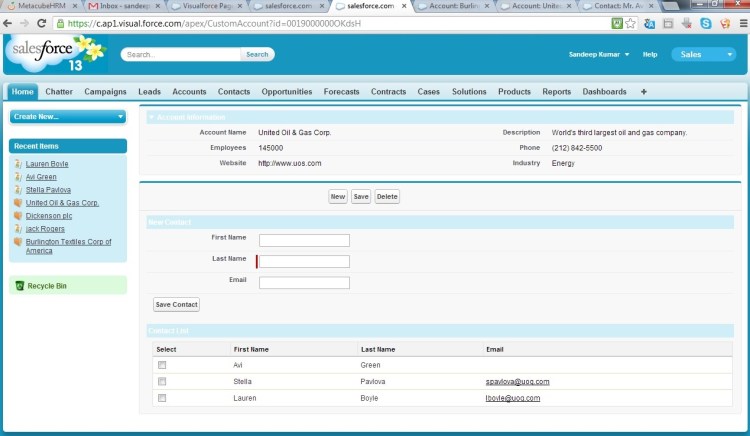
We have to use wrapper class for displaying the check box in a data table or page block table. I am providing sample code which creates new contact, save and delete selected contact records of respective Account.

Page:


Apex Code:

 
public class CustomAccountController {

public Account acc{get;set;}
private Id AccId{get;set;}
public List contactList{get;set;}
public contact newCont{get;set;}

class ContactWrapper{
public Contact cont { get; set; }
public boolean isSelected{ get; set; }
ContactWrapper(Contact c) {
cont = c;
isSelected = false;
}
}


public CustomAccountController() {
try {
AccId = ApexPages.currentPage().getParameters().get('id');
if(AccId != null) {
acc = [select Name,Description,NumberOfEmployees,Phone,Website,Industry from Account where id = :AccId];
initContact(acc);
} else {
ApexPages.addmessage(new ApexPages.message(ApexPages.severity.Error, 'Please pass parameter to this page. For eg. /apex/CustomAccount?id=0019000000OKdsH'));
}
} catch(Exception e) {
apexPages.addMessages(e);
}
}

public void initContact(Account acc) {
if(acc != null) {
contactList = new List();
for(Contact c : [Select Id, FirstName, LastName, Email from Contact where AccountID =: acc.Id]) {
contactList.add(new ContactWrapper(c));
}
}
}
public pageReference save() {
try {
List contactToUpdate = new List();
for(ContactWrapper c: contactList) {
if(c.isSelected) {
contactToUpdate.add(c.cont);
}
}
update contactToUpdate;
} catch(Exception e) {
apexPages.addMessages(e);
}
return null;
}

public pageReference delet() {
try {
List contactToDelete = new List();
for(ContactWrapper c: contactList) {
if(c.isSelected) {
contactToDelete.add(c.cont);
}
}
delete contactToDelete;
initContact(acc);
} catch(Exception e) {
apexPages.addMessages(e);
}
return null;
}

public pageReference newContact() {
newCont = new Contact(AccountId = accId);
return null;
}

public pageReference saveNewContact() {
try {
upsert newCont;
newCont = null;
initContact(acc);
} catch(Exception e) {
apexPages.addMessages(e);
}
return null;
}
}
Feel free to write your comment or mail me at sandeep.saini482@gmail.com for any further query.

Display a Multi-picklist as Checkboxes

Assume Military_Branches__c is of multipicklist type but you want to display it as check boxes on VF page.

Task1: created a VF page and write following codes between pageblocksection.


Task 2: create a method in controller which will return the list of selectOptions


public List militaryBranch{get;set;} //this will contain the values of selected checkboxes
public List getMilitaryBranches() {
list options = new list();
try {
//Military_Branches__c is a multipicklist
Schema.DescribeFieldResult fieldResult = Contact.Military_Branches__c.getDescribe();
list values = fieldResult.getPickListValues();
for (Schema.PicklistEntry a : values) {
options.add(new SelectOption(a.getLabel(), a.getValue()));
}
} catch (Exception e) {
ApexPages.addMessages(e);
}
return options;
}

Best way to debug your code.

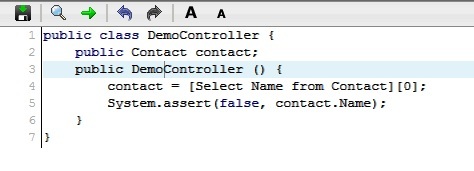
This example will show how to debug code in a short and best way. You have to use System.assert to expose your code for debugging purpose.

 Lets Assume-
You have created a page which uses DemoController and which are not showing expected value on the page . So you want to debug the value of Name field of Contact object. Below is the code

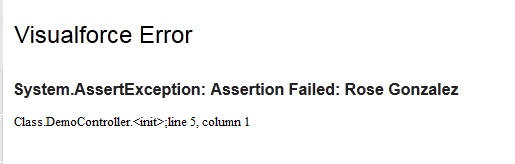
//Page exposes contact Name in the form of following error 

Now, you have known that contact.Name contains ‘Rose Gonzalez‘.

What to do when there is problem in displaying field value on page.

Field may be hidden due to field level security or might be that it doesn’t contain any value. If this is the problem, then write following apex code:

 
/*showing whether contact.FirstName contains a value*/
public class DemoController {
public Contact contact;
public DemoController () {
contact = [Select Name from Contact][0];
System.assert(false, contact.Name);
}
}

/*If the field was hidden due to field level security and FirstName contains a value ‘Sandeep’ then it will display on page as*/
 System.AssertException: Assertion Failed: Sandeep