Do you love Netflix but hate the repetitive parts?
We’ve all been there. You’re settling in for a weekend marathon of your favorite show. But every 20 minutes, you’re reaching for the mouse to skip a 2-minute intro, or you’re manually scrubbing through a slow-paced scene that seems to go on forever. Even worse, you fall asleep and wake up three seasons later, having no idea where you left off.
Enter Netflix Master Skipper Pro—the ultimate Chrome extension designed to give you total control over your viewing experience. Whether you are a power user who wants to speed-run a series or someone who just wants to automate the boring stuff, this tool is for you.
🚀 What is Netflix Master Skipper Pro?
This isn’t just another “skip intro” button. It is a comprehensive suite of tools that runs quietly in the background (or with a helpful visual overlay) to automate your playback. It handles the timing, the skipping, and even the pausing, so you can just sit back and relax.
🌟 Key Features
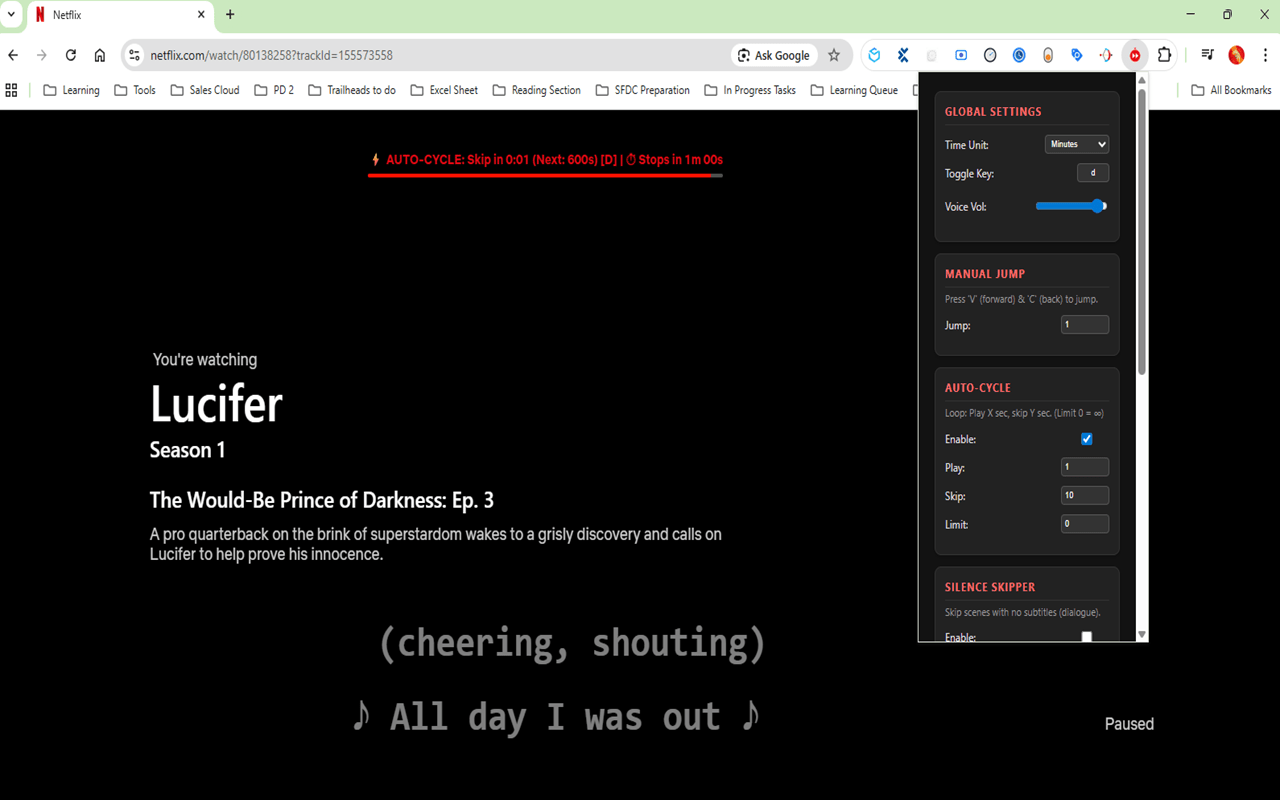
1. ♻️ Auto-Cycle Mode (The Binge-Watcher’s Dream)
Have you ever watched a show where the intro isn’t at the start, or the credits run for 5 minutes? Auto-Cycle creates a custom loop for you. You can tell the extension to:
- Play for 5 minutes (300 seconds).
- Skip for 2 minutes (120 seconds).
- Repeat.
This is perfect for anime, sitcoms, or older shows with predictable formats. It automatically jumps over the parts you don’t want to see, hands-free.
2. 🔇 Silence Skipper
Watching a slow-paced foreign film or a drama with long, drawn-out pauses? The Silence Skipper analyzes the subtitles in real-time. If no dialogue is detected for a set duration (e.g., 5 seconds), it automatically skips ahead. It’s like having a smart editor cutting out the fluff live as you watch.
3. 🎮 Custom Manual Controls
Netflix’s default 10-second skip is fine, but sometimes you need more power.
- Press
vto jump forward (Default: 60s). - Press
cto jump backward (Default: 60s). - Press
xto toggle your active features on/off instantly.
You can customize these durations down to the second in the settings menu.
4. 💤 Auto Stop / Sleep Timer
Never lose your place again. If you know you’re prone to dozing off, set the Auto Stop timer.
- Example: Set it to 30 minutes.
- After 30 minutes of playback, the extension will automatically pause the video.
- Netflix stops playing, and you wake up exactly where you intended to stop.
🎨 Visual Overlay & Customization
We know power users love data. The extension adds a sleek, draggable Heads-Up Display (HUD) to your Netflix player.
- Status Bar: See exactly when the next skip is coming.
- Progress Bar: Watch the timer count down visually (Green → Red).
- Draggable: Move it anywhere on the screen so it doesn’t block subtitles.
- Minimalist? You can hide the overlay completely in the settings and let the app run in the background.
🛠️ How to Get Started
- Install the extension on your browser.
- Open Netflix and start playing a video.
- Click the Extension Icon (top right of browser) to open the control panel.
- Choose your mode: Check “Auto-Cycle” or “Silence Skipper” and adjust the seconds to fit the show you are watching.
- Enjoy! Use the
xkey to toggle the feature on or off without leaving full-screen mode.
📥 Download Today
Stop wasting time on intros, outros, and silence. Take control of your stream with Netflix Master Skipper Pro.
 SFDC Arjuna