Problem:
I need to display Lightning Modal when a button is clicked. I want to display that button in custom lwc component.
Solution:
We will be creating a LWC component using lightning-modal-* tags.
What is a Modal?
The modal is a window that is displayed over the existing application and deactivates the functionality of the rest of the content. Modals are often used to direct users’ attention to take action or view a message from the application.
How to display Modal?
To create a lightning modal component, import LightningModal from lightning/modal. The lightning/modal module provides the LightningModal component to create a modal window on top of the current app window. A modal interrupts a user’s workflow.
LightningModal implements the SLDS modals blueprint.
Create a modal component in response to a user action, such as clicking a button or link. The modal blocks interaction with everything else on the page until the user acts upon or dismisses the modal.
Unlike other components, this component doesn’t use a lightning-modal tag or extend LightningElement. There is no lightning-modal component. Instead, you create a modal by extending LightningModal and using these helper lightning-modal-* components to provide a header, footer and the body of the modal.
lightning-modal-bodylightning-modal-headerlightning-modal-footer
The lightning-modal-body component is required for the modal template. The lightning-modal-header and lightning-modal-footer components are optional but recommended.
How to open Modal Instance?
LightningModal provides an .open() method which opens a modal and returns a promise that asynchronously resolves with the result of the user’s interaction with the modal.
How to Close a Modal Instance?
Use this.close(result) to close the modal, where result is anything you want to return from the modal. The .close() operation is asynchronous to display a brief fade out animation before the modal is destroyed. The result data can’t be modified after the close operation begins.
You can also close the modal with the default close button, the X at the top right corner. Closing a modal like this is the same as calling this.close() with an undefined result, so any data input is lost.
Now lets dive deep into the code-
baseLightningModal Component
<template>
    <lightning-modal-header label={content}></lightning-modal-header>
    <lightning-modal-body>
    <form>
        <div class="slds-box slds-theme_default">
            <lightning-input
                name="firstName"
                label="First Name"
                value="">
            </lightning-input>
            <lightning-input
                name="lastName"
                label="Last Name"
                value="">
            </lightning-input>
            <lightning-input
                type="date"
                name="birthdate"
                label="Birthdate"
                value="">
            </lightning-input>
            <lightning-input
                type="email"
                name="emailAddress"
                label="Email Address"
                value="">
            </lightning-input>
            <lightning-input
                type="tel"
                name="mobile"
                label="Mobile"
                value="">
            </lightning-input>
        </div>
    </form>
    </lightning-modal-body>
    <lightning-modal-footer>
        <div class="slds-m-top_small slds-align_absolute-center">
            <lightning-button
                variant="Neutral"
                label="Cancel and close"
                class="slds-m-left_x-small"
                onclick={handleClose}>
            </lightning-button>
            <lightning-button
                variant="brand"
                class="slds-m-left_x-small"
                label="Save"
                onclick={handleSave}>
            </lightning-button>
        </div>
    </lightning-modal-footer>
</template>
import { api } from 'lwc';
import LightningModal from 'lightning/modal';

export default class BaseLightningModal extends LightningModal {
    @api content;

    handleClose() {
        this.close('done');
    }

    handleSave() {
				alert('Data has been saved');
    }
}
<?xml version="1.0" encoding="UTF-8"?>
<LightningComponentBundle xmlns="http://soap.sforce.com/2006/04/metadata">
    <apiVersion>56.0</apiVersion>
    <isExposed>true</isExposed>
    <targets>
        <target>lightning__RecordPage</target>
        <target>lightning__AppPage</target>
        <target>lightning__HomePage</target>
    </targets>
</LightningComponentBundle>
LightningModalExample Component
<template>
		<div class="slds-box slds-theme_default">
		<lightning-button-group>
				<lightning-button onclick={handleLead} label="Submit Lead" aria-haspopup="modal"></lightning-button>
				<lightning-button label="Check Lead Status"></lightning-button>
		</lightning-button-group>
		</div>
</template>
import { LightningElement } from 'lwc';
import myModal from 'c/baseLightningModal';

export default class LightningModalExample extends LightningElement {
    /*async handleLead() {
        const result = await myModal.open({
            size: 'small',
            description: 'Accessible description of modal\'s purpose',
            content: 'Lead Generation Form',
        });
        console.log(result);
    }*/
		handleLead() {
		 		myModal.open({
            size: 'small',
            description: 'Accessible description of modal\'s purpose',
            content: 'Lead Generation Form'
        });
		}
}
<?xml version="1.0" encoding="UTF-8"?>
<LightningComponentBundle xmlns="http://soap.sforce.com/2006/04/metadata">
    <apiVersion>56.0</apiVersion>
    <isExposed>true</isExposed>
    <targets>
        <target>lightning__RecordPage</target>
        <target>lightning__AppPage</target>
        <target>lightning__HomePage</target>
    </targets>
</LightningComponentBundle>
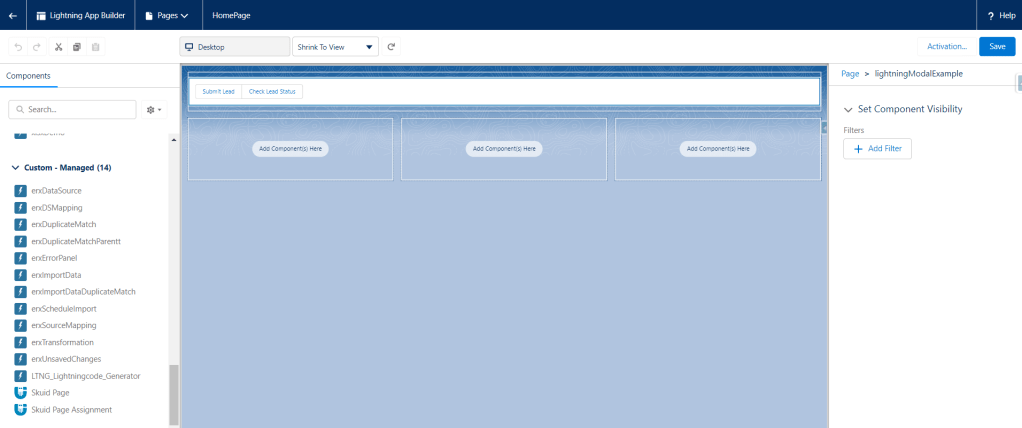
Demo
We display modal in lwc when submit lead button is clicked-
 SFDC Arjuna