Let’s first understand why we need to create an email as a quick action.
Problem Statement:
Sending an email through quick action is not available for some of the salesforce objects out of the box. For eg. Contact.
Solution:
We create lwc component using (Global) Send Email action and then create quick action using this lwc which will allow you to open an email composer with predefined values. To achieve this, we are using Headless quick action approach using Navigation Service.
What is Headless quick action?
A headless quick action executes custom code in a Lightning web component. Unlike a screen action, a headless action doesn’t open a modal window.
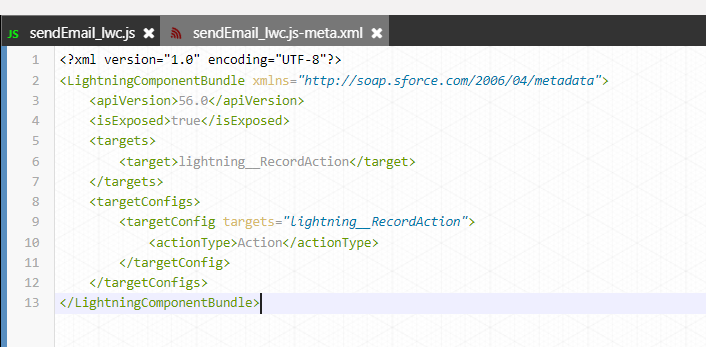
To enable your component to be used as a headless quick action, configure a target.
In your Lightning web component, always expose invoke() as a public method for headless quick actions. The invoke() method executes every time the quick action is triggered.
What is Navigation Service?
To navigate to another page, record, or list in Lightning Experience, we use the navigation service (lightning/navigation) in lwc.
The lightning/navigation service is supported only in Lightning Experience, Experience Builder sites, and the Salesforce mobile app. It isn’t supported in other containers, such as Lightning Components for Visualforce, or Lightning Out.
What are Global Quick Actions?
Global actions let users log call details, create or update records, or send email, all without leaving the page they’re on. Global create actions enable users to create object records, but the new record has no direct relationship with other records.
We use Global.SendEmail global action in lwc controller to open email composer with predefined values.
Now let’s dive deep in the LWC code-

Now expose this lwc as headless quick action using lightning_RecordAction target-
Now create a quick action button-

This quick action need to be added on the page layout as shown in below screenshot-

Demo:
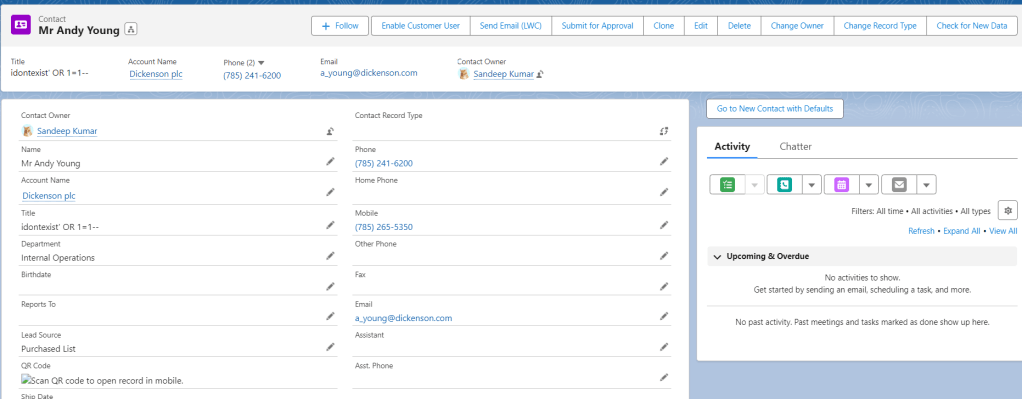
Once user clicks on this quick action ‘Send Email (LWC)’, email composer is opened as a popup

 SFDC Arjuna