Sometimes there is a requirement where you want to show/hide certain fields based on some criteria but that was not possible with standard salesforce layout and thats why dynamic forms came into picture. With dynamic forms we can customize highlighted panel and the detail view of the record page.
On the highlighted panel, you can just customize the actions and its visibility while on the detail view, you can customize field position and its visibility based on certain conditions.

How can you enable Dynamic form:-
Go to object’s lightning record page which you wish to upgrade, select the “Record Detail” or “Highlights Panel” component, and choose “Upgrade Now” as shown below-

Click next and select appropriate page layout you wish to migrate. You also delete existing details and start from the scratch. For eg. I have edited teacher’s record page layout to display section and fields from scratch by deleting existing components. I am displaying phone field dynamically based on other field ‘is Phone Display?’ as shown in below screenshot-
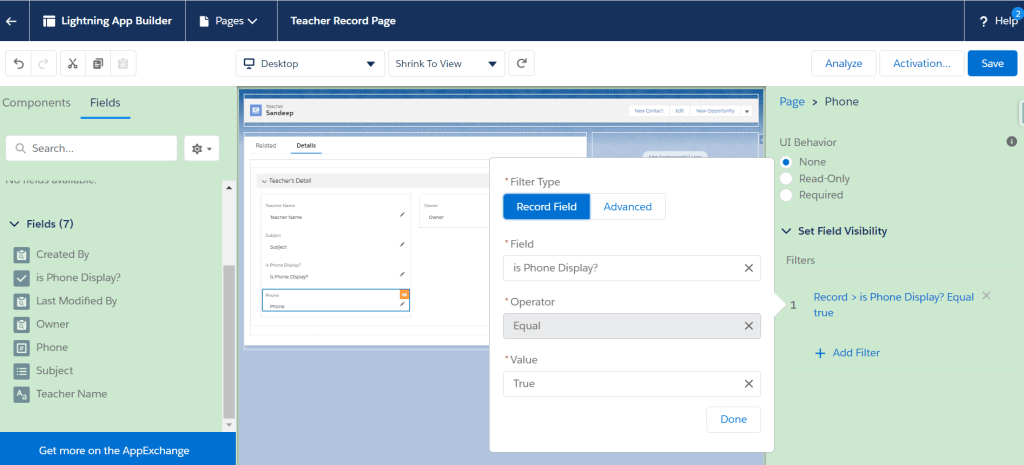
Note: Dynamic Forms is currently only available for custom objects; standard objects such as Accounts and Opportunities are not supported. Also its supported only for the desktop version. If want to use for the mobile, please use ‘Record detail – Mobile’ component.
Preview:
 SFDC Arjuna